
ansi.nvim.
Table of Contents
ansi.nvim

A Neovim plugin that renders ANSI color escape codes as actual colors in buffers using concealer.
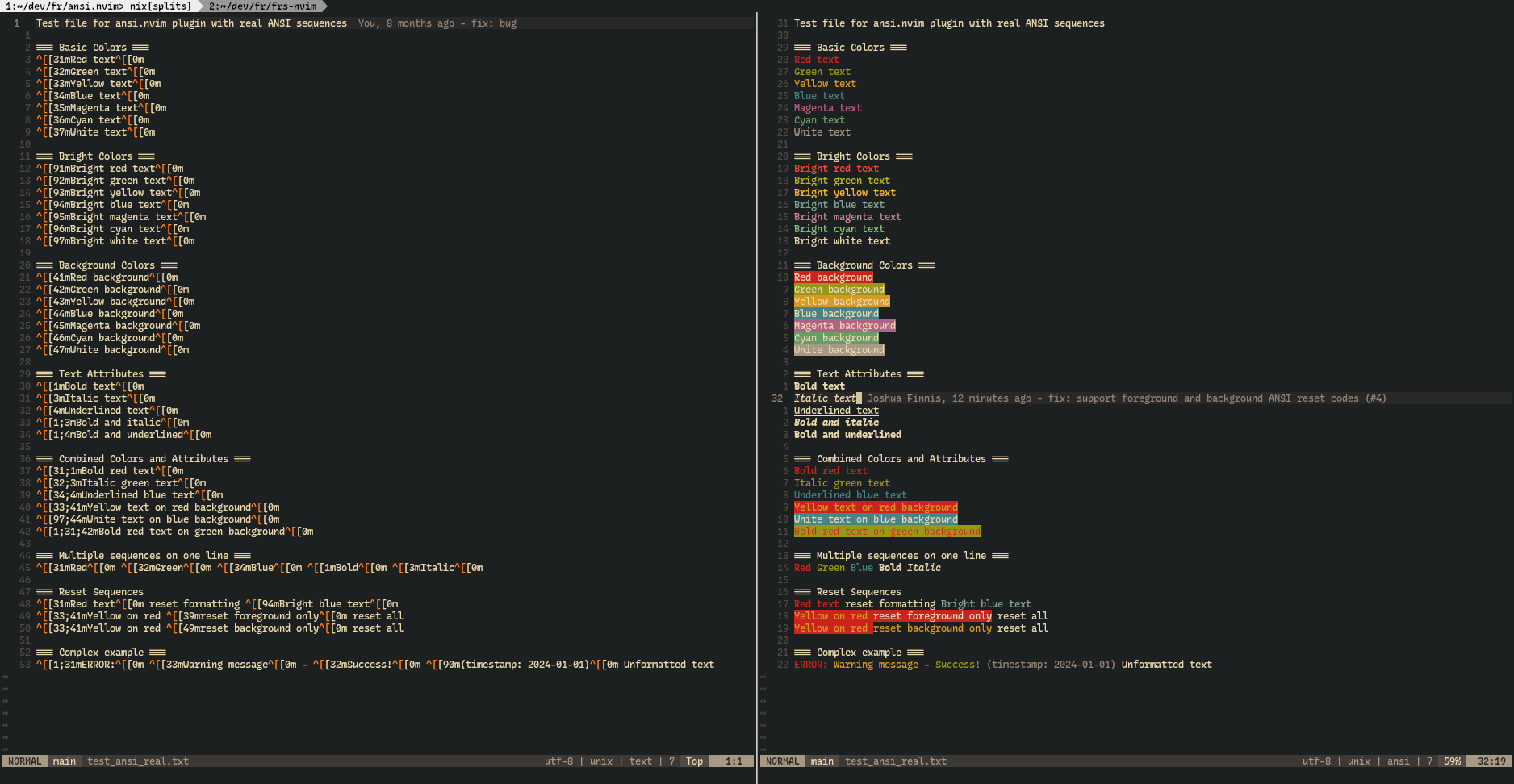
Demo shown using ./test_ansi_real.txt.
Features
- Renders ANSI escape sequences as actual colors
- Uses Neovim's concealer to hide escape codes
- Supports foreground and background colors
- Supports text attributes (bold, italic, underline)
- Real-time highlighting updates as you edit
- Configurable auto-enable for specific filetypes
- Auto-enable for content read from stdin by default
Installation
Using lazy.nvim
{
  '0xferrous/ansi.nvim',
  config = function()
    require('ansi').setup({
      auto_enable = false,        -- Auto-enable for configured filetypes
      auto_enable_stdin = true,   -- Auto-enable for piped stdin content
      filetypes = { 'log', 'ansi' },
    })
  end
}
Using packer.nvim
use {
  '0xferrous/ansi.nvim',
  config = function()
    require('ansi').setup()
  end
}
Using vim-plug
Plug '0xferrous/ansi.nvim'

" In your init.lua or vimrc:
lua require('ansi').setup()
Manual Installation
git clone https://github.com/0xferrous/ansi.nvim.git ~/.local/share/nvim/site/pack/plugins/start/ansi.nvim
Usage
Commands
:AnsiEnable- Enable ANSI color rendering for current buffer:AnsiDisable- Disable ANSI color rendering for current buffer:AnsiToggle- Toggle ANSI color rendering for current buffer
Lua API
local ansi = require('ansi')

-- Setup with custom config
ansi.setup({
  auto_enable = true,
  auto_enable_stdin = true,
  filetypes = { 'log', 'ansi', 'term' },
})

-- Manual control
ansi.enable()    -- Enable for current buffer
ansi.disable()   -- Disable for current buffer
ansi.toggle()    -- Toggle for current buffer
Configuration
require('ansi').setup({
  -- Automatically enable for configured filetypes
  auto_enable = false,

  -- Automatically enable when buffer content was read from stdin
  -- Useful for commands like: cat file.log | nvim -
  auto_enable_stdin = true,

  -- Filetypes to auto-enable when auto_enable is true
  filetypes = { 'log', 'ansi' },

  -- Color theme: 'classic', 'modern', 'catppuccin', 'dracula', 'onedark', 'gruvbox', 'terminal'
  theme = 'gruvbox',
})
auto_enable_stdin
auto_enable_stdin defaults to true, so ANSI rendering is automatically enabled for buffers populated from stdin.
Example:
printf '\033[31mred\033[0m\n' | nvim -
This can be disabled with:
require('ansi').setup({
  auto_enable_stdin = false,
})
When enabled, ANSI rendering is activated automatically after Neovim finishes reading stdin.
Color Themes
'classic'- Traditional ANSI colors (muted, original)'modern'- Modern terminal colors (vibrant, like Windows Terminal)'catppuccin'- Soft pastel colors'dracula'- Dracula theme colors'onedark'- One Dark theme colors'gruvbox'- Gruvbox dark colors (like bat uses)'gruvbox_dark'- Same as 'gruvbox''gruvbox_light'- Gruvbox light variant'terminal'- Try to use your terminal's actual colors
Supported ANSI Codes
Colors
- Standard colors: black, red, green, yellow, blue, magenta, cyan, white
- Bright colors: bright_black, bright_red, etc.
- Both foreground (30-37, 90-97) and background (40-47, 100-107) colors
Text Attributes
- Bold (1)
- Italic (3)
- Underline (4)
- Reset (0)
Testing
Quick Test
-
Open the provided test file:
nvim test_ansi.txt -
Enable ANSI rendering:
:AnsiEnable -
You should see colored text with ANSI escape sequences concealed
Generate Test Data
Use the provided script to generate ANSI output:
# Generate test output
./test_script.sh > test_output.log

# Open in Neovim
nvim test_output.log

# Enable ANSI rendering
:AnsiEnable
Manual Testing
Create a buffer with ANSI codes:
[31mThis is red text[0m
[32;1mThis is bold green text[0m
[33;4mThis is underlined yellow text[0m
[34;42mThis is blue text on green background[0m
Then run :AnsiEnable to see the colors rendered.
Development
Running Tests
# Run unit tests
just test

# Run linting
luacheck lua/ --globals vim

# Run style check
stylua --check lua/
CI/CD
The project uses GitHub Actions for continuous integration:
- Tests: Runs on Neovim versions 0.8.3, 0.9.5, 0.10.0, 0.11.3, and nightly
- Linting: Uses luacheck for Lua code analysis
- Style: Uses stylua for code formatting